

 Current position > News detail
『100 Ml/Min Flow Meter Modbus Integration Procedures』Related information(v cone flow meter|rotary gas meter|gallon meter|gear meter|metal tube rotameter|glass tube rotameter|nutating disk meter|transit time ultrasonic flow meter|wedge flow meter|pd meters|hydraulic flow meter|ultrasonic water flow meter|water flow meter|air flow meter|magnetic water flow meter|oxygen flow meter|gas flow meter|argon flow meter|air velocity meter|gasoline flow meter|fuel flow meter|ultrasonic water meter|digital water meter|nitrogen flow meter|solid flow meter|Oxygen tank flow meter|digital water flow meter|diesel fuel flow meter|steam flow meter|02 flow meter|compressed air flow meter|oil flow meter|liquid flow meter)
100 mL/min Flow Meter Modbus Integration Procedures
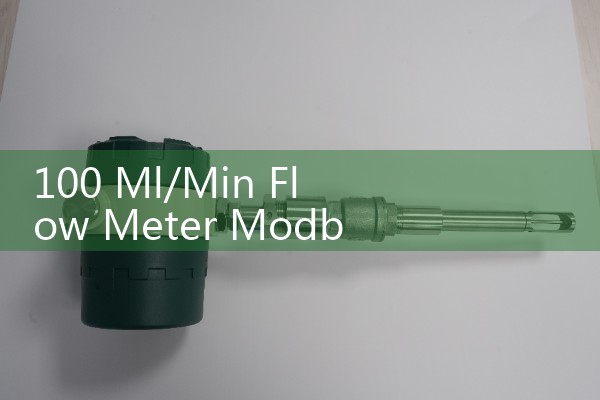
Quick Answer: For a 100 mL/min micro flow meter with Modbus, connect the RS485 A and B terminals to your PLC, set the serial parameters to 19200 baud, 8 data bits, even parity, 1 stop bit, and read holding registers 40001-40002 as a 32-bit IEEE 754 float to get instantaneous flow in mL/min. Silver Automation Instruments ships these meters with standard Modbus RTU protocol, no proprietary DLL or driver required. Most engineers finish the integration in under 30 minutes.
Common Applications for Micro Flow Meters
We supply 100 mL/min flow meters to chemical dosing, fuel additive injection, pharmaceutical coating, and lubricant metering lines. A paint manufacturer in Indonesia uses our SMF-100 for catalyst dosing. A flavoring plant in Chile meters vanilla extract with the same model. Typical fluids have a viscosity up to 500 cP and pressure up to 40 bar. The wetted parts are 316L stainless steel. Specify Kalrez seals for aggressive solvents like MEK or acetone.
RS485 Wiring and Power Supply
The meter comes with a 4-pin M12 connector or a cable gland. Wire red to 24 V DC positive, black to 0 V, yellow to RS485 A (non-inverting), green to RS485 B (inverting), and connect the shield drain wire. Use a shielded twisted pair cable like Belden 3106A. Keep the total bus length under 1000 meters. Connect the shield to earth ground at one point only. We have seen intermittent readings on many sites caused by floating shields. In practice, most PLCs from Siemens, Allen-Bradley, and Schneider need an RS485 expansion module. Connect A to A and B to B. Do not swap them.
Default Communication Settings
Our factory default is slave ID 1, 19200 baud, 8 data bits, even parity, 1 stop bit. You can change the slave ID by writing to holding register 40010 with function code 06. The new ID takes effect immediately. Here is a tip: first test with a USB-to-RS485 converter and Modbus Poll software. This step saves hours of debugging. On a multi-drop bus with up to 32 meters you must assign unique IDs. Most engineers skip this part on single-meter installations and keep ID 1.
Key Modbus Registers for the SMF-100
All register values are accessed with function code 03. The map is simple and flat.
Register 40001-40002: Instantaneous mass flow rate, 32-bit float, unit mL/min. A hex value of 0x42C80000 equals 100.0 mL/min.
Register 40003-40004: Totalizer, 32-bit unsigned integer, unit mL. The counter rolls over after 4,294,967,295 mL, so reset it periodically in your SCADA program.
Register 40005-40006: Fluid density, 32-bit float, unit kg/m³. Use this to detect product change or bubbles.
Register 40007-40008: Temperature, 32-bit float, unit °C.
Register 40009: Status flags, 16-bit integer. Bit 0 over-range, bit 1 empty pipe, bit 2 sensor fault.
All floats use big-endian byte order. If your PLC expects little-endian, swap the high and low words after reading.
Reading Flow Data With a Siemens S7-1200 PLC
A customer in Vietnam recently integrated our 100 mL/min meter to dose cutting oil on a CNC lathe. He
Troubleshooting Common Modbus Issues
No response from the meter? First check the 24 V DC power LED. If it is off the internal fuse might be blown. Next, verify the slave ID with a broadcast scan. Many times a customer has set the wrong baud rate. The factory default is 19200, but we have seen meters changed to 9600 on site. Also inspect A/B wiring. The idle voltage between A and B should be roughly 1.5 to 5 V DC. If you read 0 V the line may be shorted or missing bias resistors. Because the meter uses half-duplex RS485, make sure your master releases the bus after sending a request. A common mistake is forcing full-duplex mode on an RS232-to-RS485 converter.
Frequently Asked Questions
Q: Can the 100 mL/min flow meter output both 4-20 mA and Modbus at the same time?
A: Yes. The SMF-100 provides both interfaces simultaneously. The 4-20 mA loop gets power from the PLC analog input. Modbus data stays independent, so you can use the analog signal for PID control and the digital bus for data logging.
Q: How do I reset the totalizer to zero via Modbus?
A: Write the value 0 to registers 40003 and 40004 using function code 16 (write multiple registers). Send two words, both 0x0000. The totalizer clears immediately.
Q: What connector does the meter use?
A: Standard is a 4-pin M12 male circular connector. A cable gland version is available for panel-mount installations. Specify your preference when ordering.
Q: Can I measure gas at 100 mL/min with this meter?
A: No, the SMF-100 micro Coriolis meter measures liquids only. For gas micro flows our thermal mass flow meter series supports rates from 20 mL/min to 2000 mL/min and also has Modbus.
Q: What is the typical response time for a Modbus read?
A: The meter updates flow every 100 ms. A polling rate of 200 ms gives stable data without saturating the bus. You can poll as fast as 80 ms, but we recommend 200 ms for SCADA and PLC systems.
Get a Quotation or Full Documentation
If you need a 100 mL/min flow meter with Modbus for dosing, blending, or pilot plant experiments, send us your fluid name, maximum pressure in bar, temperature in °C, and preferred connection size (for example, 1/4 inch NPT or 6 mm tube). Also mention your PLC brand and required accuracy. We will email you a commercial offer, wiring diagram, and the complete Modbus register map within one business day. Contact Silver Automation Instruments at [email protected] or visit our Australia site flow-meter.com.au.